
Web培训
美国上市公司 · 亿元级外企Java培训企业

一款纯css3实现的超炫3D表单
发布:达内 来源:达内 时间: 2015年01月09日
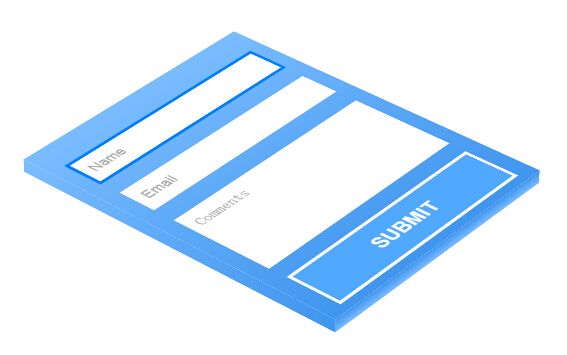
今天要给大家分享一款纯 css3 实现的超炫3D表单。该特效页面的加载的时候3d四十五度倾斜,当鼠标经过的时候表单动画回正。效果非常炫,一起看下效果图:...
-
<
p style="margin:0px 0px 0.75em;font-size:16px;line-height:28.796875px;text-indent:1em;color:#333333;font-family:'Helvetica Neue', Helvetica, Tahoma, Arial, STXihei, 'Microsoft YaHei', 微软雅黑, sans-serif;font-style:normal;font-variant:normal;font-weight:normal;letter-spacing:normal;orphans:auto;text-align:start;text-transform:none;white-space:normal;widows:auto;word-spacing:0px;-webkit-text-stroke-width:0px;background-color:#FFFFFF;">
今天要给大家分享一款纯
css3
实现的超炫3D表单。该特效页面的加载的时候3d四十五度倾斜,当鼠标经过的时候表单动画回正。效果非常炫,一起看下
效果图:
< span style="color:#333333;font-family:'Helvetica Neue', Helvetica, Tahoma, Arial, STXihei, 'Microsoft YaHei', 微软雅黑, sans-serif;font-size:16px;font-style:normal;font-variant:normal;font-weight:normal;letter-spacing:normal;line-height:28.796875px;orphans:auto;text-align:start;text-indent:16px;text-transform:none;white-space:normal;widows:auto;word-spacing:0px;-webkit-text-stroke-width:0px;background-color:#FFFFFF;"> < p style="margin:0px 0px 0.75em;font-size:16px;line-height:28.796875px;text-indent:1em;color:#333333;font-family:'Helvetica Neue', Helvetica, Tahoma, Arial, STXihei, 'Microsoft YaHei', 微软雅黑, sans-serif;font-style:normal;font-variant:normal;font-weight:normal;letter-spacing:normal;orphans:auto;text-align:start;text-transform:none;white-space:normal;widows:auto;word-spacing:0px;-webkit-text-stroke-width:0px;background-color:#FFFFFF;"> < p style="margin:0px 0px 0.75em;font-size:16px;line-height:28.796875px;text-indent:1em;color:#333333;font-family:'Helvetica Neue', Helvetica, Tahoma, Arial, STXihei, 'Microsoft YaHei', 微软雅黑, sans-serif;font-style:normal;font-variant:normal;font-weight:normal;letter-spacing:normal;orphans:auto;text-align:start;text-transform:none;white-space:normal;widows:auto;word-spacing:0px;-webkit-text-stroke-width:0px;background-color:#FFFFFF;"> 实现的代码。 < p style="margin:0px 0px 0.75em;font-size:16px;line-height:28.796875px;text-indent:1em;color:#333333;font-family:'Helvetica Neue', Helvetica, Tahoma, Arial, STXihei, 'Microsoft YaHei', 微软雅黑, sans-serif;font-style:normal;font-variant:normal;font-weight:normal;letter-spacing:normal;orphans:auto;text-align:start;text-transform:none;white-space:normal;widows:auto;word-spacing:0px;-webkit-text-stroke-width:0px;background-color:#FFFFFF;"> html代码: < div style="font-size:16px;line-height:28.796875px;color:#333333;font-family:'Helvetica Neue', Helvetica, Tahoma, Arial, STXihei, 'Microsoft YaHei', 微软雅黑, sans-serif;font-style:normal;font-variant:normal;font-weight:normal;letter-spacing:normal;orphans:auto;text-align:start;text-indent:0px;text-transform:none;white-space:normal;widows:auto;word-spacing:0px;-webkit-text-stroke-width:0px;background-color:#FFFFFF;">
-
<div id="face">
-
<div id="content">
-
<p>
-
<input type="text" placeholder="Name" /></p>
-
<p>
-
<input type="text" placeholder="Email" /></p>
-
<p>
-
<textarea placeholder="Comments"></textarea></p>
-
<p>
-
<input type="button" value="SUBMIT" /></p>
-
</div>
- </div>
-
-
body
-
{
-
-webkit-perspective: 3000;
-
perspective: 3000;
-
overflow: hidden;
-
}
-
#face
-
{
-
margin: 0;
-
padding: 0;
-
width: 320px;
-
height: 400px;
-
-webkit-transform: rotateX(60deg) rotateZ(-50deg);
-
transform: rotateX(60deg) rotateZ(-50deg);
-
-webkit-transform-style: preserve-3d;
-
transform-style: preserve-3d;
-
-webkit-transition: all 2s;
-
transition: all 2s;
-
position: absolute;
-
top: 0;
-
left: 0;
-
right: 0;
-
margin: auto;
-
}
-
#face:hover
-
{
-
-webkit-transform: rotateX(0deg) rotateZ(0deg);
-
transform: rotateX(0deg) rotateZ(0deg);
-
}
-
#content
-
{
-
width: 320px;
-
height: 375px;
-
padding: 15px 0px;
-
background: -webkit-linear-gradient(top, rgba(122,188,255,1) 0%, rgba(96,171,248,1) 44%, rgba(64,150,238,1) 100%);
-
background: linear-gradient(to bottom, rgba(122,188,255,1) 0%,rgba(96,171,248,1) 44%,rgba(64,150,238,1) 100%);
-
-webkit-transform-style: preserve-3d;
-
transform-style: preserve-3d;
-
text-align: center;
-
}
-
#content:before, #content:after
-
{
-
content: '';
-
position: absolute;
-
top: 0;
-
left: 0;
-
right: 0;
-
bottom: 0;
-
background: inherit;
-
}
-
#content:before
-
{
-
-webkit-transform-origin: left center;
-
-ms-transform-origin: left center;
-
transform-origin: left center;
-
-webkit-transform: rotateY(90deg);
-
transform: rotateY(90deg);
-
width: 15px;
-
}
-
#content:after
-
{
-
-webkit-transform-origin: bottom center;
-
-ms-transform-origin: bottom center;
-
transform-origin: bottom center;
-
-webkit-transform: rotateX(90deg);
-
transform: rotateX(90deg);
-
height: 15px;
-
top: auto;
-
bottom: 0;
-
background-position: bottom center;
-
}
-
-
p input[type="text"], p textarea
-
{
-
width: 258px;
-
font-size: 18px;
-
padding: 10px;
-
margin-top: 10px;
-
border: 1px solid #fff;
-
}
-
p input[type="text"]
-
{
-
height: 24px;
-
}
-
p textarea
-
{
-
height: 100px;
-
resize: none;
-
}
-
p input[type="button"]
-
{
-
width: 278px;
-
border: 4px solid #fff;
-
background-color: #51A8FF;
-
color: #fff;
-
font-size: 24px;
-
padding: 14px 0px;
-
font-weight: 700;
-
-webkit-transition: all 0.5s;
-
transition: all 0.5s;
-
}
-
p input[type="button"]:hover
-
{
-
background: #9ECEFF;
-
color: #222;
-
}
-
p input:focus, textarea:focus
-
{
-
outline: 4px solid #007FFF;
- }
上一篇:用拼积木的方式做HTML5产品
- 一款纯css3实现的超炫3D表单(01月09日)
- 未来应用专注于html5商业应用(01月09日)
- 构建一站式AJAX Web应用的开发框架(01月09日)
- 2015年HTML5游戏面临机遇和挑战 (01月09日)
- Web体验与以往的五大不同(01月09日)


